ขั้นตอนการทำ
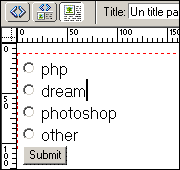
1. สร้างฟอร์มขึ้นมาด้วย Radio Button ผมใช้โปรแกรม Dreamweaver นะครับง่ายดี
 |
2. กำหนดค่าตัวแปล และค่าที่เราจะส่งไป
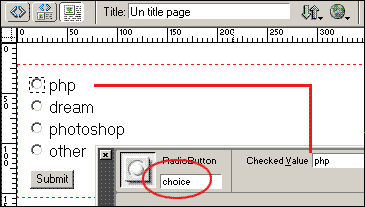 |
โค้ดที่ใช้สร้าง Form
| <html> <head> <title>Un title page</title> <meta http-equiv="Content-Type" content="text/html; charset=windows-874"> </head> <body bgcolor="#FFFFFF"> <form name="form1" method="post" action="show.php"> //ผมส่งข้อมูลมาที่ show.php <input type="radio" name="choice" value="php"> php<br> <input type="radio" name="choice" value="radiobutton"> dream<br> <input type="radio" name="choice" value="radiobutton"> photoshop<br> <input type="radio" name="choice" value="radiobutton"> other </form> </body> </html> |
3. เขียน Scripts ทดสอบว่าข้อมูลที่เราส่งมาใช้ได้หรือไม่
| <? echo "ข้อมูลที่คุณเลือก : ".$choice; ?> |
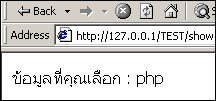
4. ผลที่ได้จากการทดสอบการส่งค่า
 |
5. ถ้าเราต้องการจะเก็บค่าจากตัวแปลลงฐานข้อมูลก็นำค่านั้นลงใส่ฐานข้อมูลได้เลยครับ