ขั้นตอนการทำ
1. ให้เราสร้างตารางขึ้นมาก่อน ด้วยคำสั่ง SQL โดยสร้างลงใน Database : test
| CREATE TABLE customer ( id int(11) NOT NULL auto_increment, name char(30) NOT NULL, surname char(30) NOT NULL, address char(150) NOT NULL, tel char(20) NOT NULL, PRIMARY KEY (id) ); INSERT INTO customer VALUES ( '1', 'aaaa', 'sur aa', 'test/1', '01-1111111'); INSERT INTO customer VALUES ( '2', 'bbbb', 'sur bb', 'test/2', '01-2222222'); INSERT INTO customer VALUES ( '3', 'cccc', 'sur cc', 'test/3', '01-3333333'); INSERT INTO customer VALUES ( '4', 'dddd', 'sur dd', 'test/4', '01-4444444'); INSERT INTO customer VALUES ( '5', 'eeee', 'sur ee', 'test/5', '01-5555555'); |
2. หลังจากที่เราสร้างฐานข้อมูลแล้วให้เราสร้างไฟล์แสดงผลข้อมูลจากฐานข้อมูล show.php
| <?php //กำหนดตัวแปรเพื่อนำไปใช้งาน $hostname = "localhost"; //ชื่อโฮสต์ $user = ""; //ชื่อผู้ใช้ $password = ""; //รหัสผ่าน $dbname = "test"; //ชื่อฐานข้อมูล $tblname = "customer"; //ชื่อตาราง // เริ่มติดต่อฐานข้อมูล mysql_connect($hostname, $user, $password) or die("ติดต่อฐานข้อมูลไม่ได้"); // เลือกฐานข้อมูล mysql_select_db($dbname) or die("เลือกฐานข้อมูลไม่ได้"); // คำสั่ง SQL และสั่งให้ทำงาน $sql = "select * from $tblname"; $dbquery = mysql_db_query($dbname, $sql); // หาจำนวนเรกคอร์ดข้อมูลในตาราง $num_rows = mysql_num_rows($dbquery); // เริ่มวนรอบแสดงข้อมูล $i=0; while ($i < $num_rows) { $result = mysql_fetch_array($dbquery); $id = $result[id]; $name = $result[name]; echo "($id) คุณ <font color=\"#FF0000\">$name</FONT> <A HREF=\"edit.php?id=$id\">แก้ไขข้อมูล</A><BR>"; //กำหนด Link ไปที่ไฟล์ที่เราจะแก้ไข $i++; } // ปิดการติดต่อฐานข้อมูล mysql_close(); ?> |
3. หลังจากนั้นเราสร้าง Form ขึ้นมาตั้งชื่อไฟล์ให้ตรงกับไฟล์ที่เรา link มาใรที่นี้ผมให้ชื่อไฟล์ว่า edit.php
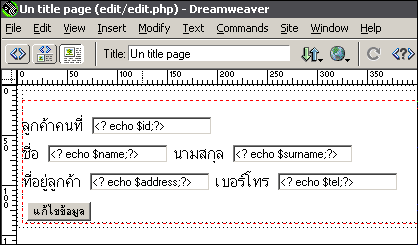 |
4. หลังจากนั้นเขียนโค้ดแทรกเข้าไปในไฟล์ edit.php ดังนี้
| <?php //กำหนดตัวแปรเพื่อนำไปใช้งาน $hostname = "localhost"; //ชื่อโฮสต์ $user = ""; //ชื่อผู้ใช้ $password = ""; //รหัสผ่าน $dbname = "test"; //ชื่อฐานข้อมูล $tblname = "customer"; //ชื่อตาราง // เริ่มติดต่อฐานข้อมูล mysql_connect($hostname, $user, $password) or die("ติดต่อฐานข้อมูลไม่ได้"); // เลือกฐานข้อมูล mysql_select_db($dbname) or die("เลือกฐานข้อมูลไม่ได้"); // คำสั่ง SQL และสั่งให้ทำงาน $sql = "select * from $tblname where id=$id"; //ตรงนี้จะเป็นข้อกำหนดให้ดึงข้อมูลตามที่เรากำหนด $dbquery = mysql_db_query($dbname, $sql); $result = mysql_fetch_array($dbquery); $id = $result[id]; $name = $result[name]; $surname = $result[surname]; $address = $result[address]; $tel = $result[tel]; // ปิดการติดต่อฐานข้อมูล mysql_close(); ?> <html> <head> <title>Un title page</title> <meta http-equiv="Content-Type" content="text/html; charset=windows-874"> <style type="text/css"> <!-- body { margin: 0px 0px; padding: 0px 0px} a:link { color: #005CA2; text-decoration: none} a:visited { color: #005CA2; text-decoration: none} a:active { color: #0099FF; text-decoration: underline} a:hover { color: #0099FF; text-decoration: underline} --> </style> </head> <body bgcolor="#FFFFFF"> |
5. หลังจากนั้นเขียนโค้ด Update เพื่อนำข้อมูลที่ผู้ใช้กรอกมาแก้ไขผมาจะเขียนไว้ที่ไฟล์ update.php
| <?php //กำหนดตัวแปรเพื่อนำไปใช้งาน $hostname = "localhost"; //ชื่อโฮสต์ $user = ""; //ชื่อผู้ใช้ $password = ""; //รหัสผ่าน $dbname = "test"; //ชื่อฐานข้อมูล $tblname = "customer"; //ชื่อตาราง // เริ่มติดต่อฐานข้อมูล mysql_connect($hostname, $user, $password) or die("ติดต่อฐานข้อมูลไม่ได้"); // เลือกฐานข้อมูล mysql_select_db($dbname) or die("เลือกฐานข้อมูลไม่ได้"); // คำสั่ง SQL และสั่งให้ทำงาน $sql = "update $tblname set id=id, name='$name', surname='$surname', address='$address', tel='$tel' where id=$id"; // กำหนดคำสั่ง SQL เพื่อแสดงข้อมูล $dbquery = mysql_db_query($dbname, $sql); echo "<Font Size=4><B>แก้ไขข้อมูลเรียบร้อยแล้ว</B>"; echo "<Br><A Href=\"show.php\"> ดูผลการเปลี่ยนแปลง</A>"; // เครื่องหมาย \ หน้า " ทำให้ไม่เกิด error เมื่อรัน ?> |
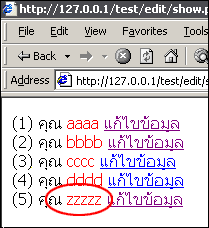
6. หลังจากนั้นเราลองทดสอบดูโดยเปิดไฟล์ show.php ขึ้นมาก่อน
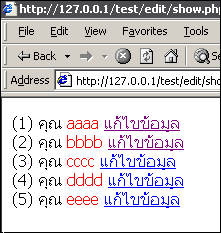 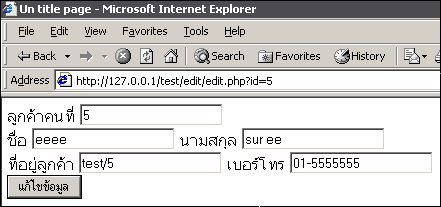 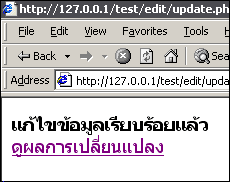  |
7. ขอให้สนุกกับการทำเว็บ