ขั้นตอนการทำ
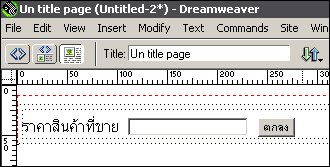
1. ให้เราสร้าง Form ขึ้นมา ดังภาพ
 |
โค้ด Java ที่ใช้
| <SCRIPT language=JavaScript> function check_number() { e_k=event.keyCode //if (((e_k < 48) || (e_k > 57)) && e_k != 46 ) { if (e_k != 13 && (e_k < 48) || (e_k > 57)) { event.returnValue = false; alert("ต้องเป็นตัวเลขเท่านั้น... \nกรุณาตรวจสอบข้อมูลของท่านอีกครั้ง..."); } } </script> |
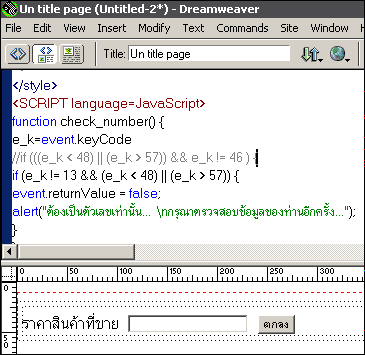
2. หลังจากนั้นให้เรานำโค้ด Java ไปวางไว้ส่วน Head ของไฟล์
 |
3. หลังจากนั้นเขียนโค้ดที่ Textbox ให้ดึง Function จาก Java เมื่อผู้ใช้ป้อนค่า
| <input type="text" name="textfield" onkeypress=check_number();> //การเรียกใช้ Function |
4. โค้ดสร้าง Form ทั้งหมด
| <html> <head> <title>Un title page</title> <meta http-equiv="Content-Type" content="text/html; charset=windows-874"> <style type="text/css"> <!-- body { margin: 0px 0px; padding: 0px 0px} a:link { color: #005CA2; text-decoration: none} a:visited { color: #005CA2; text-decoration: none} a:active { color: #0099FF; text-decoration: underline} a:hover { color: #0099FF; text-decoration: underline} --> </style> <SCRIPT language=JavaScript> function check_number() { e_k=event.keyCode //if (((e_k < 48) || (e_k > 57)) && e_k != 46 ) { if (e_k != 13 && (e_k < 48) || (e_k > 57)) { event.returnValue = false; alert("ต้องเป็นตัวเลขเท่านั้น... \nกรุณาตรวจสอบข้อมูลของท่านอีกครั้ง..."); } } </script> <body bgcolor="#FFFFFF"> |
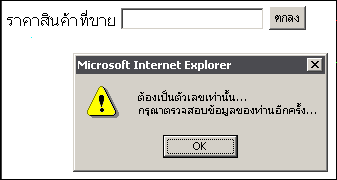
5. หลังจากนั้นลองทดสอบดูครับ
 |
6. ขอให้สนุกกับการเขียนเว็บ